Effects & EQ
Effects & EQ
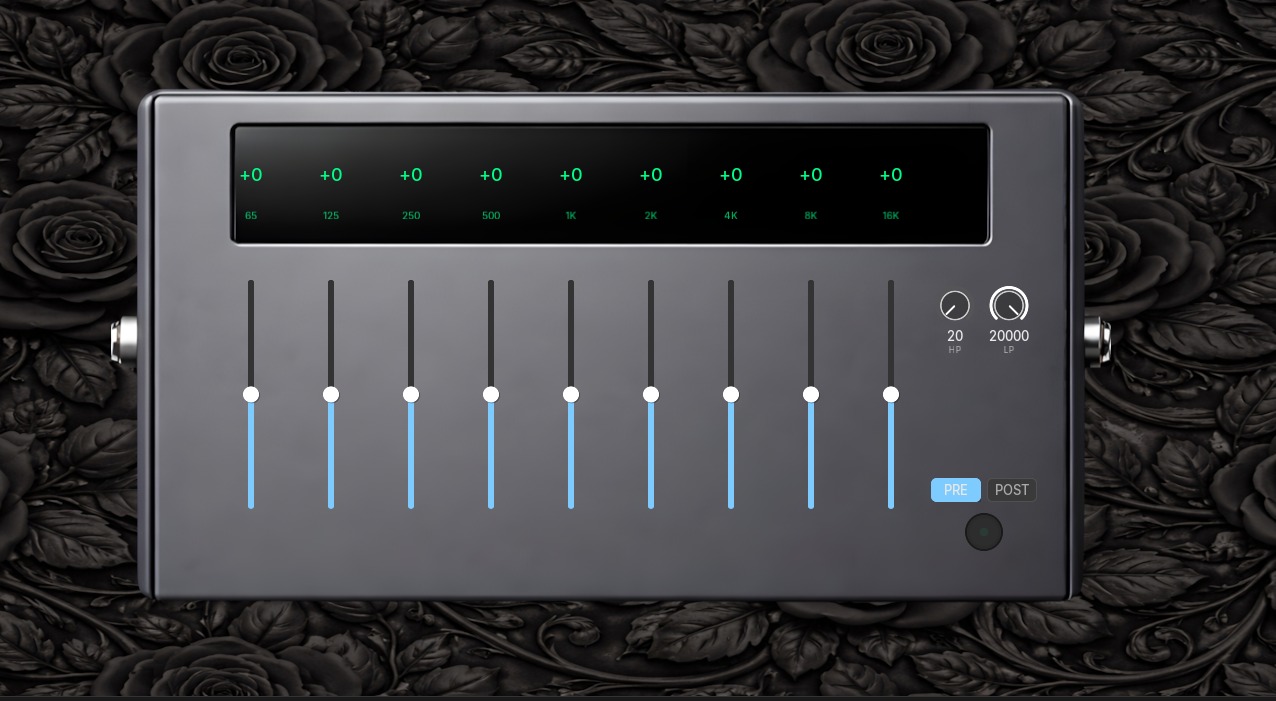
Section titled “Effects & EQ”Aethis includes a powerful dual 9-band graphic equalizer that can be placed before or after the amplifier in the signal chain. Combined with global input/output controls, you have complete control over your tone.
9-Band Graphic EQ
Section titled “9-Band Graphic EQ”The equalizer provides surgical tone control with 9 frequency bands spanning the full guitar range.
Frequency Bands
Section titled “Frequency Bands”| Band | Frequency | Character |
|---|---|---|
| 1 | 65 Hz | Sub-bass, rumble |
| 2 | 125 Hz | Bass, low thump |
| 3 | 250 Hz | Low-mid warmth |
| 4 | 500 Hz | Mid-range body |
| 5 | 1 kHz | Upper-mid presence |
| 6 | 2 kHz | High-mid bite |
| 7 | 4 kHz | Treble clarity |
| 8 | 8 kHz | High treble, air |
| 9 | 16 kHz | Extreme highs, sparkle |
Each band can be adjusted from -12 dB to +12 dB.
Pre vs Post Mode
Section titled “Pre vs Post Mode”The EQ can operate in two modes, switchable via the PRE/POST button:
Pre-Amp EQ (PRE)
Section titled “Pre-Amp EQ (PRE)”Places the EQ before the amplifier in the signal chain.
Effect: Changes how the amp responds to your signal. Boosting frequencies here affects the amp’s distortion character.
Use cases:
- Shaping your tone before it hits the amp
- Boosting mids for more aggressive crunch
- Cutting bass to tighten high-gain tones
- Creating mid-scooped tones that the amp then distorts
Post-Amp EQ (POST)
Section titled “Post-Amp EQ (POST)”Places the EQ after the amplifier in the signal chain.
Effect: Shapes the amp’s output without changing its distortion character. More surgical and predictable.
Use cases:
- Final tone polish and correction
- Matching your tone to a mix
- Removing problem frequencies
- Subtle adjustments that don’t affect amp feel
High-Pass and Low-Pass Filters
Section titled “High-Pass and Low-Pass Filters”In addition to the 9 bands, the EQ includes adjustable filters:
| Filter | Range | Description |
|---|---|---|
| HP (High-Pass) | 20-500 Hz | Removes frequencies below this point |
| LP (Low-Pass) | 2000-20000 Hz | Removes frequencies above this point |
These are useful for:
- Cutting rumble and sub-bass (HP)
- Removing harsh highs and noise (LP)
- Fitting your guitar into a dense mix
Global Controls
Section titled “Global Controls”Input Section
Section titled “Input Section”| Control | Range | Description |
|---|---|---|
| Input Gain | -12 to +12 dB | Adjusts signal level entering Aethis |
| Gate | -60 to 0 dB | Noise gate threshold |
| On/Off | Toggle | Master bypass for input |
Output Section
Section titled “Output Section”| Control | Range | Description |
|---|---|---|
| Output Gain | -12 to +12 dB | Master output level |
Additional Controls
Section titled “Additional Controls”| Control | Options | Description |
|---|---|---|
| Tuner | Button | Opens the built-in chromatic tuner |
| Bright | On/Off | Adds high-frequency presence |
Signal Flow
Section titled “Signal Flow”The complete signal path in Aethis:
- Input → Input gain and gate
- Pre-FX → Boost, Noise Gate, Compressor, Overdrive
- EQ (Pre mode) → 9-band graphic equalizer
- Amp → Rosaria, Lumina, or Noctis
- EQ (Post mode) → 9-band graphic equalizer
- Post-FX → Cabinet, Chorus, Delay, Reverb
- Voices → 4-voice harmonizer
- Output → Output gain
Note: The EQ appears in only one position at a time (Pre or Post), not both simultaneously.
Start flat: Begin with all EQ bands at 0 dB. Make small adjustments (2-3 dB) and listen carefully. Large boosts often sound worse than subtle cuts.
Cut before boosting: If something sounds muddy, try cutting the problem frequency rather than boosting others. This keeps your overall level consistent.
Pre-EQ for amp feel: Use Pre mode when you want to change how the amp responds. A mid boost here will make the amp crunch differently.
Post-EQ for polish: Use Post mode for final adjustments. This is where you fine-tune your tone without affecting how the amp feels under your fingers.
High-pass for clarity: A subtle high-pass around 80-100 Hz removes rumble and tightens your low end, especially useful for high-gain tones.