Voices
Voices
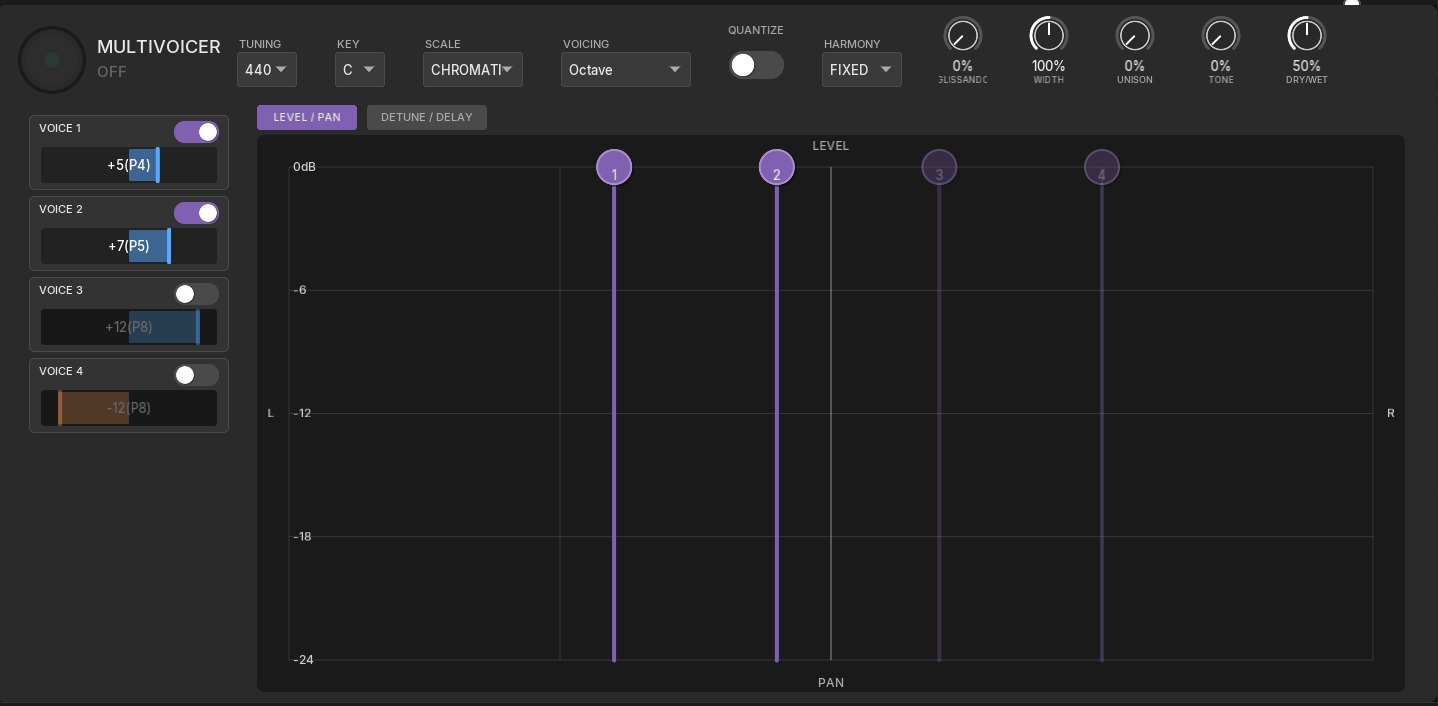
Section titled “Voices”The Voices section is a 4-voice pitch shifter and intelligent harmonizer that transforms your guitar into a full harmony instrument. Create anything from subtle doubling effects to lush choir-like harmonies, all in real-time.
Overview
Section titled “Overview”Each of the four voices can be independently pitch-shifted up to an octave in either direction (±15 semitones). Combined with scale quantization, this allows you to create musically correct harmonies that follow your playing automatically.
Key capabilities:
- 4 independent pitch-shifted voices
- ±15 semitone range per voice (full octave up or down)
- Intelligent scale quantization with 8 scale types
- Per-voice level, pan, detune, and delay controls
- MIDI input for real-time chord-following harmonies
- Stereo width and global effects processing
Per-Voice Controls
Section titled “Per-Voice Controls”Each voice has its own set of controls for complete flexibility:
| Parameter | Range | Description |
|---|---|---|
| Enable | On/Off | Toggle individual voice on or off |
| Interval | -15 to +15 | Pitch shift in semitones (0 = unison, 12 = octave, 15 = max) |
| Level | 0-100% | Volume of this voice in the mix |
| Pan | L to R | Stereo position of the voice |
| Detune | ±100 cents | Fine-tuning for thickness or pitch correction |
| Delay | 0-500ms | Per-voice delay for slapback and doubling effects |
Common Interval Settings
Section titled “Common Interval Settings”- 0 (Unison) — Same pitch as input, use detune for thickening
- ±3 (Minor 3rd) — Dark, moody harmony
- ±4 (Major 3rd) — Bright, happy harmony
- ±5 (Perfect 4th) — Open, suspended sound
- ±7 (Perfect 5th) — Power chord interval
- ±12 (Octave) — Full, massive sound
Scale Quantization
Section titled “Scale Quantization”When enabled, scale quantization automatically adjusts voice intervals to stay within a musical scale. This ensures your harmonies are always musically correct, even when playing melodies across the fretboard.
Scale Settings
Section titled “Scale Settings”| Parameter | Options | Description |
|---|---|---|
| Quantize | On/Off | Enable scale-aware harmonization |
| Key | C through B | Root note of the scale |
| Scale | 8 types | Scale type for quantization |
Available Scales
Section titled “Available Scales”- Chromatic — All 12 notes (effectively disables quantization)
- Major — Standard major scale (Ionian mode)
- Minor — Natural minor scale (Aeolian mode)
- Harmonic Minor — Minor with raised 7th degree
- Pentatonic Major — 5-note major scale
- Pentatonic Minor — 5-note minor scale (blues-friendly)
- Dorian — Minor with raised 6th (jazz/funk)
- Mixolydian — Major with lowered 7th (blues/rock)
Global Voice Effects
Section titled “Global Voice Effects”These controls affect all voices together:
| Parameter | Range | Description |
|---|---|---|
| Glissando | 0-100% | Smooth pitch glide when changing intervals |
| Width | 0-200% | Stereo field expansion (100% = normal stereo) |
| Unison | 0-100% | Subtle detuning spread for chorus-like thickness |
| Tone | 0-100% | Overall brightness of the harmonized voices |
| Dry/Wet | 0-100% | Balance between original and harmonized signal |
MIDI Mode
Section titled “MIDI Mode”Connect a MIDI controller or send MIDI from your DAW to control voice intervals in real-time.
How it works:
- Enable MIDI mode in the Voices section
- Play chords on your MIDI controller or send MIDI notes from your DAW
- The voices automatically tune to match the incoming MIDI notes
- Your guitar provides the tone and dynamics, MIDI controls the harmony
This is ideal for:
- Live performance alongside a keyboard player
- Pre-programmed chord progressions in your DAW
- Creating complex harmonies that follow chord changes automatically
- Vocoder-style effects where MIDI controls the pitch
Voicing Presets
Section titled “Voicing Presets”Quick-access presets provide common harmony arrangements:
- Octave — Voices stacked at octave intervals for massive, full sound
- Closed — Voices arranged close together for tight, focused harmonies
- Open — Voices spread apart for bigger, more spacious sound
- Custom — Start from scratch with manual control of all parameters
Tips for Best Results
Section titled “Tips for Best Results”For harmony leads: Set Voice 1 to +4 (major 3rd) and Voice 2 to +7 (perfect 5th), enable scale quantization, and set the correct key. This creates classic two-part harmonies that follow your melody.
For thickness without pitch change: Use voices at 0 semitones with slight detune (10-30 cents) and different pan positions. This creates a natural doubling effect similar to recording multiple takes.
For ambient textures: Spread voices across octaves (+12, -12), add delay to individual voices with different times, and increase the width setting. Combine with reverb and delay effects for expansive soundscapes.
For tight rhythm playing: Keep intervals at octaves or fifths, disable per-voice delay, and use minimal detune. This keeps the sound focused and punchy for rhythm work.
Using scale quantization effectively: Always set the correct key before playing. For songs with key changes, automate the key parameter in your DAW or use MIDI mode for real-time control.